 blog
blog
Best Smart Thermostat for Home Heating: 2026 Guide
Table of Contents
- How We Tested the Best Smart Thermostats for Home Heating
- Smart Thermostat Compatibility Check: Will It Work With Your HVAC System?
- Smart Thermostat Installation Cost: What to Expect in 2026
- How to Program a Smart Thermostat for Winter Heating
- Energy Efficiency and Cost Savings: What the Best Smart Thermostats Deliver
- Smart Home Ecosystem Integration and Accessibility Features
- Long-Term Maintenance, App Stability, and Energy Rebate Programs
- Frequently Asked Questions
Last Updated: September 22, 2026
How We Tested the Best Smart Thermostats for Home Heating
Finding the best smart thermostat for home heating starts with understanding what actually matters in a real house, not a showroom. At DC Plumbing Heating and Air Conditioning, we've spent nearly 38 years working with heating systems across South Orange County, and the pattern is clear: most thermostat problems are compatibility or setup problems, not product problems.
We evaluated thermostats on four practical criteria:
- HVAC compatibility: Does it work with the existing wiring and equipment?
- Heating performance: Does it hold temperature steadily through cold mornings?
- Setup difficulty: Can a homeowner or technician install it without surprises?
- Long-term reliability: Does the app stay stable after firmware updates?
Smart Thermostat Compatibility Check: Will It Work With Your HVAC System?
A smart thermostat compatibility check is the single step most buyers skip, and it's the one that causes the most returns. Before buying anything, confirm three things: your system voltage, your wiring, and whether you have a C-wire. Here's how to actually check each one yourself in about fifteen minutes.
Step 1: Identify Your System Type
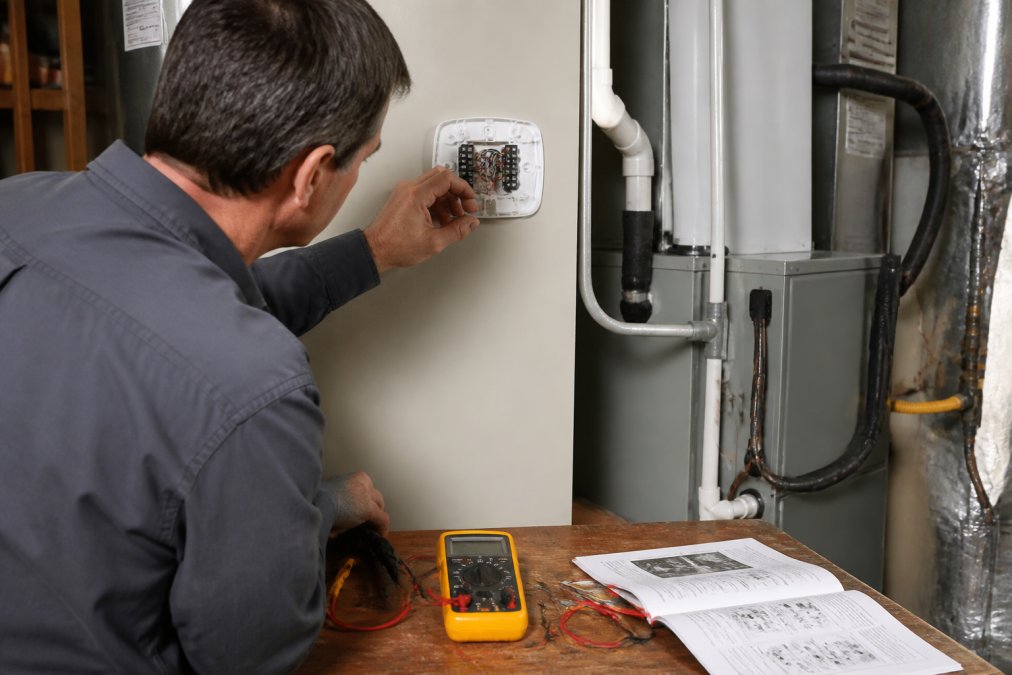
Turn off power at the breaker, then remove your current thermostat's faceplate. Look at the wires connected to the terminal block. The labels tell you almost everything:
- R, W, Y, G, C, a low-voltage (24-volt) system. This covers most gas furnaces, central air conditioners, and air-source heat pumps. Smart thermostats are designed for this category.
- Two thick wires labeled L1 and L2, or unlabeled line wires, a line-voltage system, typically 120 or 240 volts. This serves electric baseboard heaters, radiant floor heat, and some wall heaters.
- No wires at all, or a wireless receiver, a millivolt or proprietary system, common with some fireplaces and older boilers.
Step 2: Check for a C-Wire
A C-wire (common wire) supplies continuous low-voltage power to the thermostat. Most smart thermostats need one because Wi-Fi radios and color displays draw more power than batteries can reliably supply through a cold winter.
- Run a new thermostat cable from the furnace control board, the most reliable fix, but it may require fishing wire through finished walls.
- Use a power adapter kit that many manufacturers include in the box; it steals a small amount of power from the existing wiring.
- Choose a thermostat rated for no-C-wire operation, which typically uses battery assist or a power-stealing circuit.
Step 3: Confirm Voltage With a Multimeter
If the wiring labels are unclear or painted over, a multimeter settles it. With the thermostat removed and the breaker back on, set the meter to AC voltage and probe between the R wire and the C wire (or R and the bare end of the bundle if there's no C).
- Reading near 24 volts AC, low-voltage system. A standard smart thermostat will work.
- Reading near 120 or 240 volts AC, line-voltage system. You need a line-voltage-rated smart thermostat, not a standard one.
- No reading, the transformer may be off, a fuse may be blown, or you may be probing the wrong pair. Recheck before buying.
Step 4: Match the Thermostat to Your Equipment
Voltage and C-wire are only half the story. The equipment type matters too:
- Single-stage furnace or AC, almost any smart thermostat supports this.
- Multi-stage or variable-speed equipment, you need a thermostat with enough terminals (often labeled W2, Y2, or communicating terminals) to control the extra stages. A basic model will run the system, but it may only fire the first stage.
- Heat pumps with auxiliary or emergency heat, look for a thermostat that explicitly supports heat pump wiring, including the O/B reversing valve terminal and auxiliary heat control.
- Dual-fuel systems (heat pump plus gas furnace), confirm the thermostat supports dual-fuel changeover, or it may run the wrong heat source.
Step 5: Check the Manufacturer Compatibility Tool
Every major smart thermostat brand publishes an online compatibility checker. Enter your wire labels and equipment type, and it returns a yes/no plus any adapter needed. This takes two minutes and is the fastest way to avoid a return. Keep a photo of your terminal block on your phone, you'll need it for the checker and for any technician you call.
Smart Thermostat Installation Cost: What to Expect in 2026
Smart thermostat installation cost depends on your existing wiring, system type, and whether a C-wire is already present. A straightforward swap on a compatible system takes under an hour, while adding a C-wire or adapting a line-voltage system takes longer and requires a technician.
| Situation | Typical Time | Who Should Do It |
|---|---|---|
| Existing C-wire, compatible system | Under 1 hour | Homeowner or technician |
| No C-wire, adapter needed | 1-2 hours | Technician recommended |
| Line-voltage system | 2+ hours | Licensed technician only |
| New wiring run required | Half day | Licensed technician only |
How to Program a Smart Thermostat for Winter Heating
Learning how to program a smart thermostat for winter comes down to three settings: schedule, setback temperature, and occupancy rules. Get these right and the thermostat does most of the work on its own.
- Set your awake hours to your comfort temperature.
- Drop the temperature several degrees while you're away or asleep.
- Enable geofencing so the system recovers before you arrive home.
- Turn on the learning algorithm and let it adjust after the first week.
- Review energy usage reports monthly and fine-tune.
Energy Efficiency and Cost Savings: What the Best Smart Thermostats Deliver
Energy savings from a smart thermostat come from consistency, not magic. The device holds a tighter temperature band, reduces wasted runtime, and stops heating an empty house. But the size of the savings depends heavily on your climate, your equipment, and how you program it, and the biggest financial lever most buyers ignore is the rebate sitting on their utility's website.
What Actually Drives Savings
Features that move the needle:
- Occupancy detection: pauses heating when no one is home, using motion sensors, geofencing, or both.
- Auto-scheduling: builds a schedule from your actual patterns instead of a guess.
- Multi-room sensing: averages temperature across remote sensors instead of one wall location, which matters most in homes with cold spots.
- Setback programming: the classic lever, dropping the setpoint several degrees while you're away or asleep.
- Energy usage reports: show runtime spikes so you can see what your schedule is actually doing.
Homes with wide temperature swings benefit most, because the thermostat compensates for cold spots a basic programmable unit ignores. Homes with a single-zone, well-insulated layout see smaller gains.
How Much Can You Realistically Save?
Be skeptical of any single savings number. Actual results depend on your climate zone, fuel type, home envelope, and prior habits. The U.S. Department of Energy's guidance on thermostat setbacks is the most reliable public reference for how much a given setback can reduce heating energy, check the current figures there rather than trusting a marketing claim. U.S. Department of Energy thermostat and heating guidance
The Rebate Angle Most Guides Miss
Utility rebates are the most overlooked savings opportunity in this category. Many utility companies and efficiency programs offer incentives for qualifying smart thermostats, and some require professional installation to qualify. A few practical notes:
- Check before you buy, not after. Rebate eligibility often depends on the specific model, and buying the wrong one forfeits the incentive.
- Installation requirements vary. Some programs require a licensed technician to install and document the work; a self-installed unit may not qualify.
- Keep your receipt and model number. Most rebate applications ask for both, plus proof of installation.
- Stack where allowed. Manufacturer promotions and utility rebates can sometimes be combined, read the fine print on each.
Long-Term Reliability: Where Savings Quietly Disappear
A thermostat that drops offline stops saving you money, and firmware updates are the most common cause of connectivity problems after the first year. Reviews rarely cover this, but it's the difference between a device that pays for itself and one that frustrates you.
Maintenance habits that prevent problems:
- Check for firmware updates quarterly and read the release notes before installing
- Replace thermostat batteries annually if applicable
- Clean dust from vents near the thermostat
- Re-verify Wi-Fi signal strength seasonally, a router move can silently weaken the connection
- Schedule professional HVAC maintenance each fall
Smart Home Ecosystem Integration and Accessibility Features
Smart home ecosystem integration determines how well a thermostat works with the rest of your setup. Voice control through major smart speakers, mobile application access, and home automation routines all reduce how often you touch the device itself.
- Large, high-contrast displays with adjustable brightness
- Ambient light and proximity sensors that wake the screen as you approach
- Screen reader support in the mobile app
- Physical buttons for users who find touchscreens difficult
Long-Term Maintenance, App Stability, and Energy Rebate Programs
Long-term reliability separates a good purchase from a frustrating one. Firmware updates can break app connectivity, and a thermostat that drops offline stops saving you money.
Maintenance habits that prevent problems:
- Check for firmware updates quarterly
- Replace thermostat batteries annually if applicable
- Clean dust from vents near the thermostat
- Re-verify Wi-Fi signal strength seasonally
- Schedule professional HVAC maintenance each fall
Frequently Asked Questions
What is the best smart thermostat for controlling my home's heating?
The best smart thermostat for home heating depends on your HVAC system and needs. Look for models with multi-room sensors, learning algorithms, and compatibility with your existing C-wire. Features like geofencing and occupancy detection help reduce heating cycles when you're away. For homes in South Orange County, a professional compatibility check ensures the thermostat works with your specific system before you buy.
Do smart thermostats work with all heating systems?
No, smart thermostats do not work with all heating systems. Most require a low-voltage system with a C-wire, which is common in forced-air furnaces and heat pumps. Line-voltage systems, such as baseboard heaters, need different models. Always perform a smart thermostat compatibility check by reviewing your current thermostat's wiring or consulting a licensed HVAC technician to confirm your system supports the thermostat you want.
How much energy can a smart thermostat save on heating?
Energy savings from a smart thermostat vary by home, climate, and usage. Actual savings depend on your heating system's efficiency, insulation, and how you program the thermostat for winter. Many utility rebate programs offer incentives for installing Energy Star certified smart thermostats, which can offset the upfront cost.
Is Ecobee or Nest better for heating efficiency?
Both Ecobee and Nest offer strong heating efficiency features, but they differ in approach. Ecobee includes a remote temperature sensor for multi-room sensing, which helps balance uneven heating. Nest uses learning algorithms to adapt to your schedule automatically. The better choice depends on your home layout and whether you prefer manual programming or automated adjustments. A smart thermostat compatibility check with your HVAC system will confirm which model works best for your setup.